HOME SCREEN
A tiny station
on your Home Screen.
Choose an LCD barometer or a rain-outlook widget. Pressure, trend, and available weather context stay together.
BAROMETER · RAIN OUTLOOK · ALTITUDE
Record air pressure with your iPhone’s built-in barometer. Check the chance of rain, follow your altitude on a hike, and see it all in one clear view.
Coming soon on the App Store
iPhone · iPad · Apple Watch
Real screens from the app.
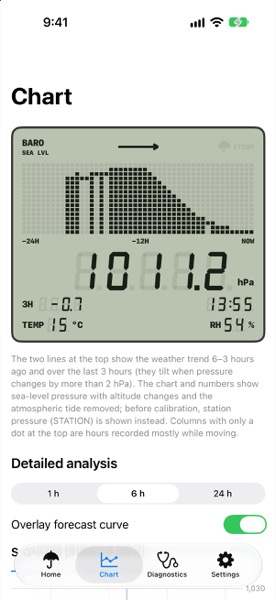
Record air pressure and how it changes with the barometer built into a supported iPhone or iPad.
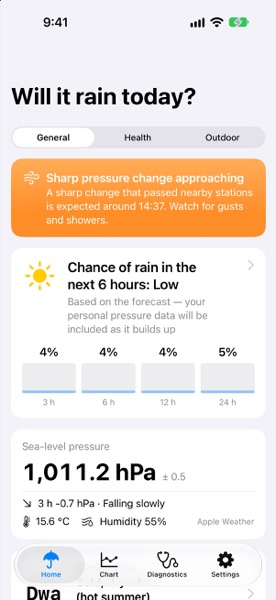
Your readings, nearby stations, and weather forecasts come together in one rain outlook.
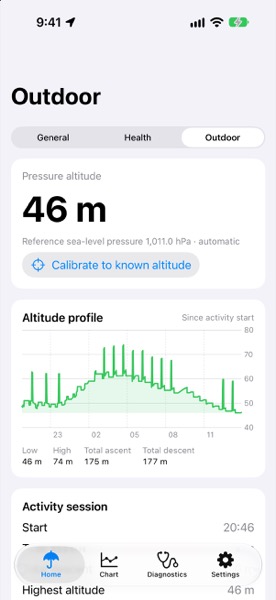
Rain before you head out, altitude on the trail. Pick the view you need.
EVERYDAY · OUTDOORS · HEALTH
Check the weather before you leave, record a hike, or look at pressure alongside your symptoms. Switch between three views for what you’re doing.
TODAY’S WEATHER
See the chance of rain over the next 3, 6, 12, and 24 hours, with current pressure, temperature, and humidity on the same screen.
Open the rationale to see which observations and forecasts the outlook used.
Get alerts when pressure drops quickly or before you head out. Minute-by-minute rain alerts are available only where Apple Weather supports them.
HIKING AND OUTDOORS
Take your station beyond the doorstep. Track barometric altitude, follow an altitude profile, and record your ascent and descent.
Calibrate with a known altitude or sea-level pressure reference.
Review changing pressure and mountain-weather signals alongside your session. Check official forecasts and local conditions before heading out.
SYMPTOMS AND PRESSURE
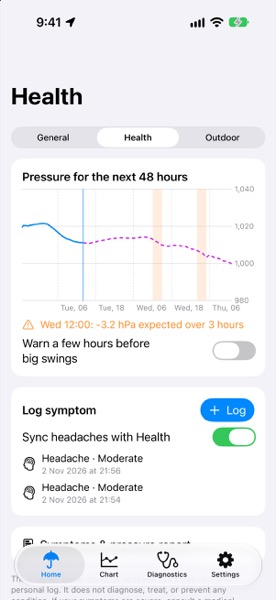
See the past 24 hours of pressure observations and the next 48 hours of model pressure alongside the symptoms you choose to record.
Log symptoms and explore recent pressure patterns. Optional Health integration supports headache reading and writing.
Set reminders for large pressure swings. These records help you explore patterns; they do not establish medical causation or provide a diagnosis.
A CLASSIC LCD LOOK
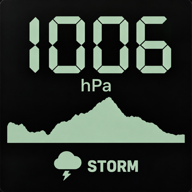
An LCD display inspired by outdoor instruments shows current pressure and the last 24 hours of change, in a light or dark theme.
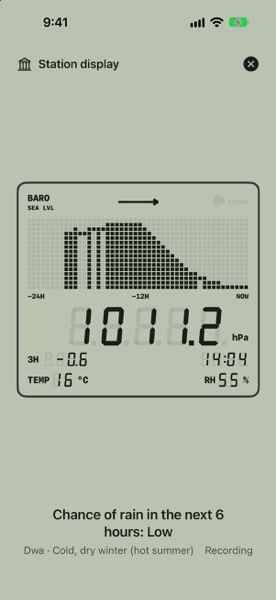
Station display shown on iPhone. iPad also supports a fixed-station setup; local recording requires a supported barometer.
NEARBY PRESSURE
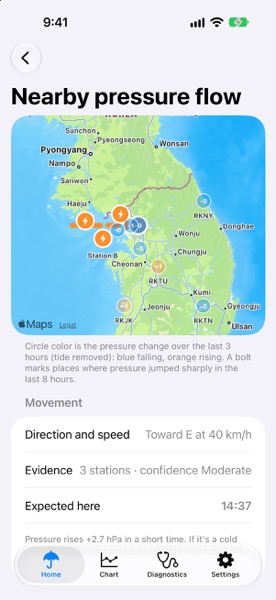
Readings from nearby airports and your own devices, together on one map. See where pressure is rising or falling, and where a big change started.
Compare how much pressure changed over the last three hours, and find places where it recently jumped.
When enough stations show a usable signal, the app estimates direction, speed, and arrival time.
Results depend on how recent and complete the station data is. Paths and arrival times are rough estimates, not a promise of when your weather will change.
WIDGETS AND DEVICES
On your Home Screen, Lock Screen, and wrist. Checking pressure and the weather takes just a glance.
HOME SCREEN
Choose an LCD barometer or a rain-outlook widget. Pressure, trend, and available weather context stay together.
LOCK SCREEN
A recording barometer Live Activity keeps the LCD view close. Updates depend on iOS and app execution.
CONNECTED DEVICES
Compare same-account iCloud stations. A paired Apple Watch displays summaries and can provide auxiliary pressure readings.
HOW THE RAIN OUTLOOK WORKS
The rain outlook combines three sources: pressure measured on your device, how often it has rained here before, and a weather forecast.
25%
Altitude-corrected pressure trends, with available climate and moisture context.
10%
Historical rain frequency for the area, season, and time of day.
65%
Apple Weather precipitation forecasts, with Open-Meteo as a fallback when Apple Weather is unavailable.
Default weights when all three inputs are available. The blend changes when data is missing. Percentages describe the blend, not forecast accuracy.
PREDICTIONS VS. OUTCOMES
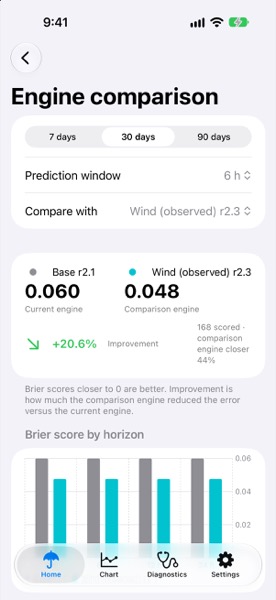
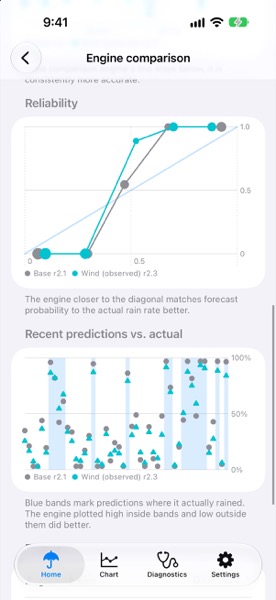
The app saves predictions from several methods at the same moment, then checks them against what actually happened. Compare the standard method with two wind-aware methods in scores and charts.
Screens show illustrative data. Comparison scores are examples and do not demonstrate real-world forecast improvement.
SCREEN BY SCREEN
Fourteen real app screens. Tap any one to enlarge it.
Rain chances, pressure, and current conditions.
See the sources behind your rain outlook.
Big numbers and a graph of pressure change.
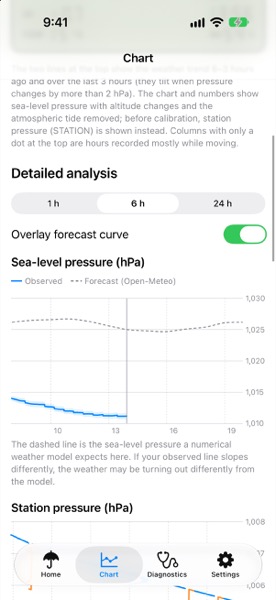
Recorded pressure and a model forecast overlay.
Altitude, altitude changes, and total ascent and descent.
Pressure changes at nearby stations and estimated movement.
Log symptoms and compare them with pressure at the time.
Today’s climate type for your area and future climate scenarios.
Scores from checking saved predictions against outcomes.
Recent predictions, outcomes, and reliability in charts.
Same-account stations, pressure offsets, and status.
A full-screen LCD barometer to leave on.
The LCD barometer and rain outlook on your Home Screen.
Pressure on your Lock Screen while recording.
Screenshots show the English interface and illustrative values. The app supports English and Korean. Website language does not change the supplied screenshots.
DATA AND PRIVACY
From records that stay on your device to what syncs through iCloud. Here’s how Pocket Weather Station handles your data.
Detailed observations and symptom records are stored on your device. Export observation and diagnostic records as a ZIP whenever you want to look at them.
Sharing between your own devices is on by default. It stores a device name, an approximate location, and five-minute pressure summaries in your private iCloud storage. Deleting data in the app does not remove these iCloud records; delete them from iCloud storage settings.
Motion and location access are used to record and correct pressure. Health access is optional. To fetch weather and elevation, the app sends an approximate location to those services.
The app targets iPhone and iPad on iOS/iPadOS 17 or later, with an optional Apple Watch companion on watchOS 10 or later. Local pressure measurement requires a supported built-in barometer. The Watch complements the phone; it is not a standalone forecast engine.
Pressure comes from the supported device’s barometer. Temperature and relative humidity come from weather providers for your area; they are not local phone-sensor measurements.
Local sensor recording, stored observations, and the bundled climate classification can remain useful without a live forecast connection once the needed location is available. Fresh forecasts, airport reports, historical downloads, and iCloud syncing require network access.
Yes, on a device with a supported barometer. Keep it at a fixed location, enable Reference station mode, start recording, and open Station display. The full-screen view keeps the display awake while open. External power is recommended for long sessions.
iOS controls background execution, widget refreshes, and Live Activities. Permissions, power settings, available data, and region affect updates and alerts. Continuous sensor collection and exact delivery times are not guaranteed.
Pocket Weather Station is coming soon to the App Store. We’ll add the App Store link to this page at launch.
Pocket Weather Station is coming soon to the App Store.
Coming soon on the App StoreWe’re preparing for launch.