Desktop · iPhone · iPad · Android

At your desk. In your hand. Your GPU servers, connected.

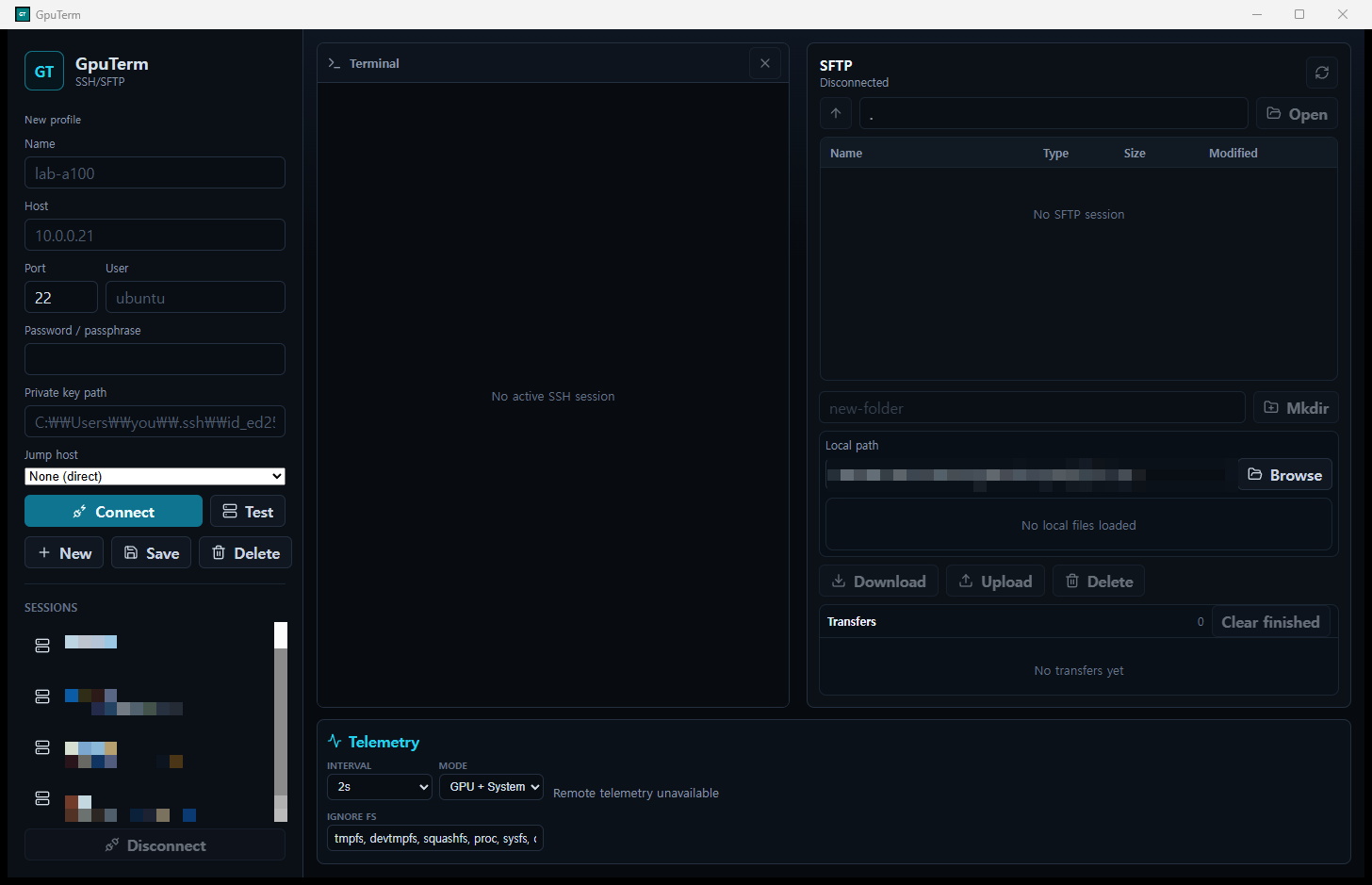
GpuTerm puts a terminal, a drag-and-drop file browser and live CPU, RAM, disk and GPU telemetry for every remote host into one desktop workspace. Native iPhone, iPad and Android clients bring terminal work and server visibility to mobile, too.

Desktop · iOS & iPadOS · Android · External displays

Get GpuTerm for iPhone & iPad ↗

Latest: beta · Source on GitHub

GpuTerm window: session sidebar, SSH terminal, SFTP browser and the live CPU, memory, disk and GPU telemetry bar

Everything a GPU box needs, in one place

Connect once. Monitoring runs on its own SSH channel, so it never blocks your shell, and core metrics need no root rights or agents on the server.

SSH terminal

Full PTY terminal (xterm.js + Rust ssh2) with split panes, search, tmux sessions, ProxyJump hosts, port forwarding, keyboard-interactive / OTP sign-in and ~/.ssh/config import.

Live GPU telemetry

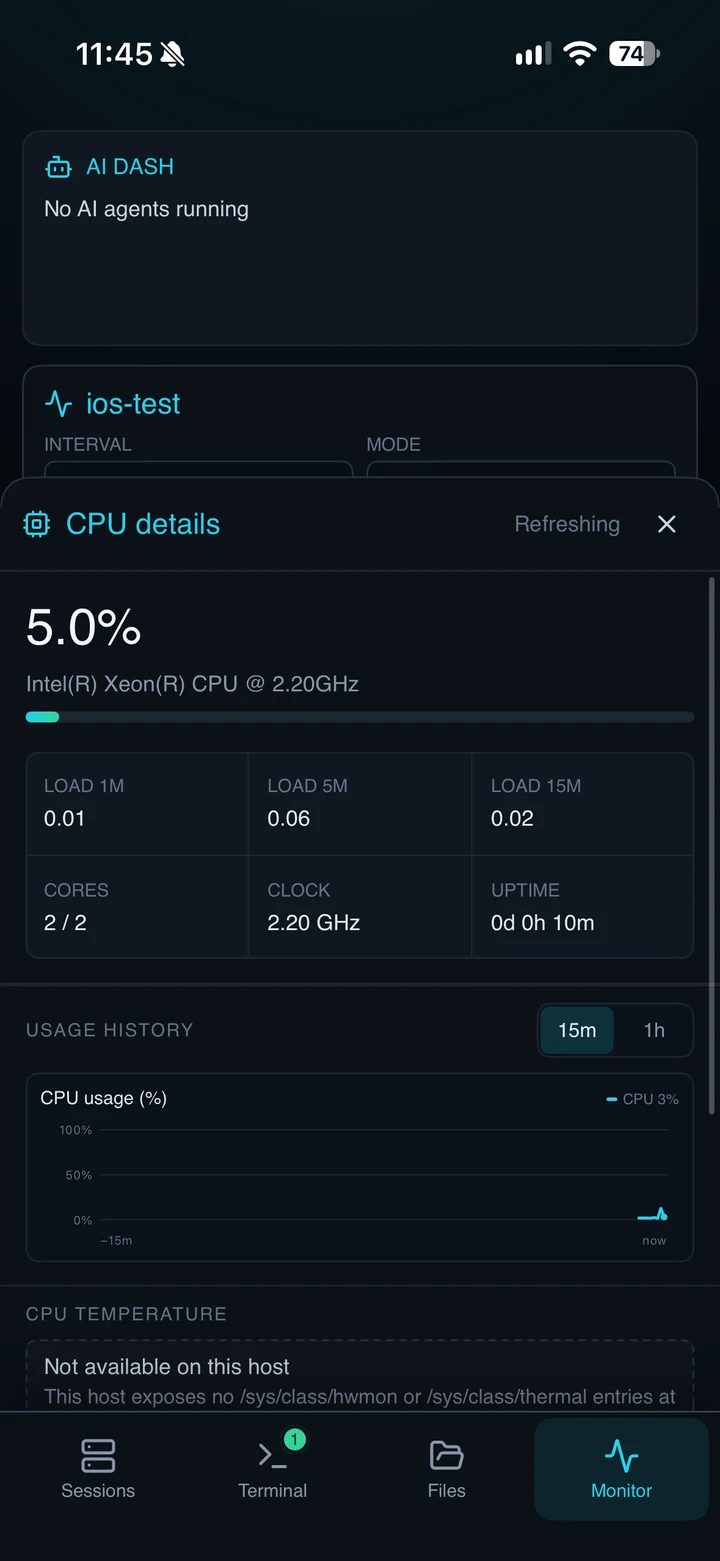
Utilization, VRAM, temperature and power for every GPU (NVIDIA, AMD, Intel, Apple Silicon), plus CPU, memory, disks and logged-in users, with history charts and threshold alerts.

SFTP browser

Drag-and-drop uploads and downloads, a local/remote two-pane view, progress and cancel, rename, delete and new folders.

Processes & containers

Who is using which GPU, top CPU and memory processes, Docker/Podman containers and Kubernetes pods, and a safe "end process" that re-checks the PID first.

LLM runtime monitoring

Ollama, vLLM, SGLang, TGI, llama.cpp, Triton and OpenAI-compatible servers: models, KV cache, queues, tokens per second and latency, directly or through an SSH tunnel.

Secure by default

Credentials in an Argon2id + AES-256-GCM vault, optional Touch ID / Windows Hello unlock, host-key verification, and GpuTerm-managed SSH keys installed and verified for you.

DESKTOP / WORKFLOW

From a remote shell to the full picture

01

A workspace that adapts to your workflow

Keep several hosts open, arrange up to four terminal cells, resize panes, and collapse the file browser or monitoring bar when you need more room. Search scrollback and reuse saved commands without leaving your session.

02

Move datasets, scripts and results

Transfer files and entire folders between your computer and server. Review progress and cancel individual transfers; temporary files are renamed after completion to avoid exposing unfinished downloads.

03

Understand the host behind the workload

Inspect resource history, threshold alerts, GPU processes, container and Kubernetes status, SQL database metrics and LLM runtime health. Available readings depend on the host, drivers, tools and account permissions.

Desktop also includes a local terminal, SSH config import, jump hosts and local/remote/SOCKS forwarding. Container and database views require the corresponding tools and permissions on the connected host.

MOBILE → EXTERNAL DISPLAY

Small device. Bigger possibilities.

Extend GpuTerm beyond your phone or tablet. Put the terminal and server metrics on a larger display while keeping your mobile device at the center of your workflow.

iOS · iPadOS

A dedicated server view on the big screen

On supported USB-C or AirPlay displays, choose Terminal, Dashboard or Monitor in a separate display scene. Dashboard brings the focused terminal together with CPU, memory, disk and GPU readings. Your iPhone or iPad remains the keyboard and control pad.

External-display text sizing is independent. Stage Manager extended windows use the regular app layout. Display support depends on the device, OS and connection; the dedicated display is covered when the app locks or enters the background.

ANDROID

Expand into a desktop-style workspace

On devices that support apps on secondary displays, open a full GpuTerm workspace—for example, in a supported desktop mode such as DeX. The main and external windows share connections, with terminal, SFTP and telemetry arranged for a wider screen.

Where a full secondary workspace is unavailable, a terminal presentation can use the phone as its keyboard/controller. Auto, Tablet and Desktop layouts adapt to window size. Device-specific desktop modes, input and display behavior still require hardware verification.

iOS & iPadOS

Your servers. Now within reach.

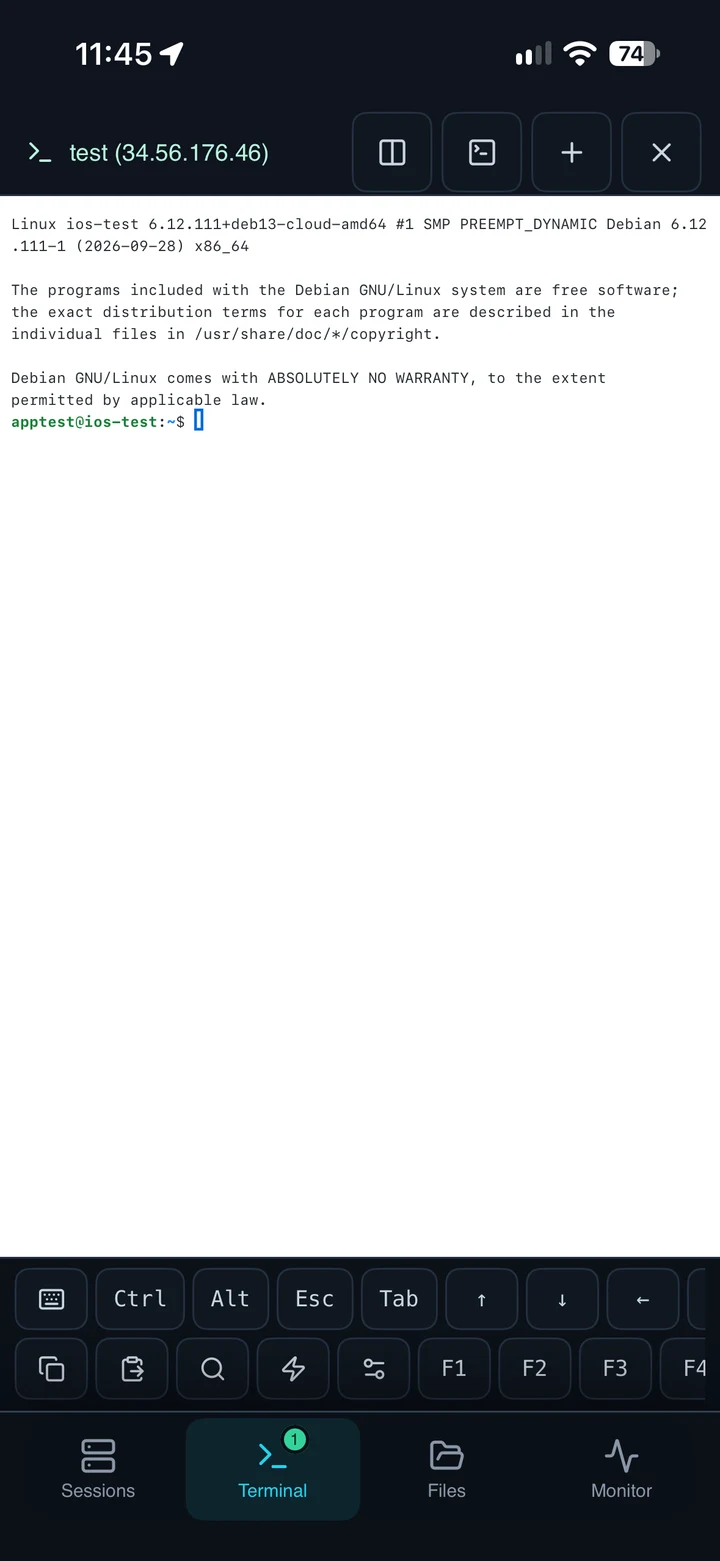
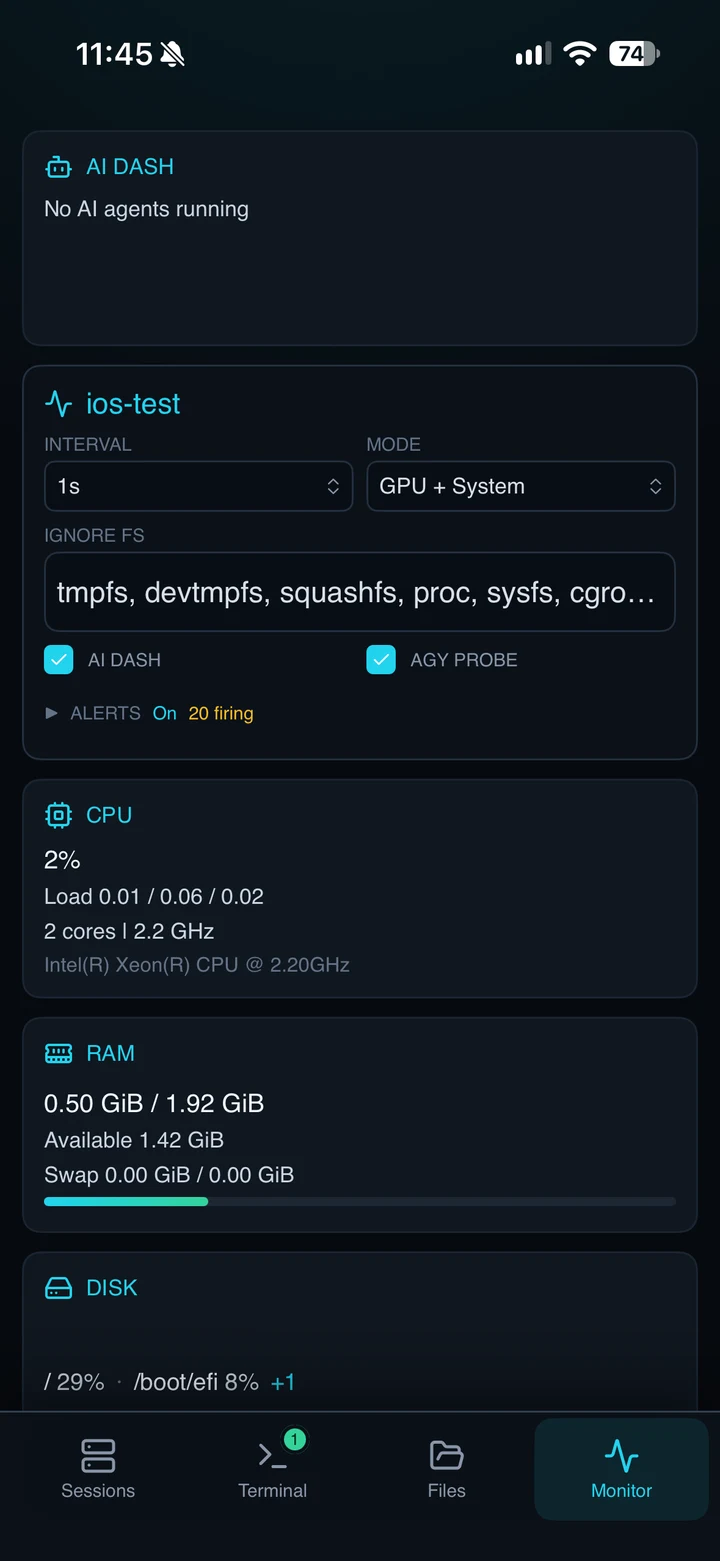
A native SwiftUI experience for iPhone and iPad, backed by a Rust SSH/SFTP core. Work in the terminal, move files and check GPU or inference-server health wherever you connect.

View on the App Store ↗

Terminal & files

Split terminals, tmux controls, a special-key toolbar and keyboard shortcuts. Browse local/remote files, transfer whole folders and manage a three-transfer queue with overwrite confirmation.

Siri & Shortcuts

Ask for GPU, CPU, memory or combined server status over a short-lived SSH connection, or open GpuTerm and connect to a saved server. Korean Siri phrases are included. Trust the host in-app first; status actions need device authentication and usable saved credentials.

Built for iPad, too

Use an adaptive workspace, hardware keyboard shortcuts and external-display dashboard. Home and Lock Screen widgets offer a server-status overview; refresh timing is managed by iOS.

Credentials under your control

Review host-key changes, reuse SSH keys and keep private keys in the device Keychain. App locking uses available device authentication. Use tmux for long-running jobs: iOS does not allow indefinite background SSH.

Screenshots are App Store submission images. This page also describes current native development; features and system requirements can differ from the installed store version. Check the App Store listing for availability and compatibility.

ANDROID / NATIVE

A mobile client. A wider workspace.

Native Kotlin and Jetpack Compose with a Rust core through JNI. Adaptive layouts support phones, tablets and desktop-style workspaces.

Google Play release preparation
  • Split terminals, remote tmux, jump hosts and SSH forwarding.
  • Local/remote file browser, folder transfers and up to three concurrent transfers.
  • GPU/system telemetry, LLM health, history and configurable resource alerts.
  • SSH key management, host-key review and Keystore-backed saved credentials.

Android is in release preparation; a Google Play listing or approval is not yet confirmed.

CONNECTED WORKFLOWS

From the terminal to your running services.

Find remote tools, open a secure path, and carry your workspace across native clients.

Remote web services

Discover TensorBoard, Jupyter, MLflow, Ray, Streamlit, Gradio, code-server and other listening ports on Linux, macOS and Windows. Open through temporary loopback SSH forwards; Linux also checks accessible Docker ports.

A workspace that travels

Opt-in iCloud/manual-file sync on iOS and selected-folder merging on Android carry configuration between devices. Passwords and private keys do not sync. External-display workspaces and iOS Siri/Shortcuts keep server status within reach.

Access under your control

Device-authenticated app and credential locks, host-key review and reusable SSH keys keep access explicit. Desktop read-only MCP service discovery omits login tokens and credential-bearing MLflow connection URIs.

Discovery depends on host tools and permissions; it does not install or start services. Current native source features may differ from installed store versions. Android remains in release preparation.

CHOOSE YOUR PLATFORM

The same essentials. Platform-native details.

Distribution and implementation overview
PlatformExperienceAvailability
DesktopWindows · macOS · Linux / Rust + TauriBeta · GitHub Releases
iPhone / iPadSwiftUI · SwiftTerm / Rust + UniFFIApp Store
AndroidJetpack Compose / Rust + JNIGoogle Play release preparation

All three native clients provide SSH, SFTP and monitoring. Desktop MCP integration is described below; mobile does not imply desktop feature parity. Telemetry depends on the remote operating system and available tools.

Let your AI assistant see your GPU servers

GpuTerm includes an MCP server. Turn it on and Claude Code, Claude Desktop, Codex or Cursor can ask about the hosts you have connected.

  • "Which server has a free GPU?" — live telemetry, free GPUs across hosts, the last hour of history, GPU processes, containers and LLM runtimes.
  • Actions only with your approval — commands, file reads and process kills each open a confirmation in GpuTerm; Deny is the default.
  • Local and audited — loopback only with a per-start token, per-host hiding, untrusted output marking and an audit log.
$ claude mcp add --scope user gputerm -- \
    "/Applications/GpuTerm.app/Contents/MacOS/gputerm" --mcp-stdio

# example conversation
> Which of my servers has an idle GPU with 20 GB free?
  ⎿ gputerm · find_free_gpus
  gpu-02 · GPU 1 (A100 80GB) — 0% busy, 79 GB free
  gpu-05 · GPU 0 (RTX 4090)  — 2% busy, 23 GB free

Download

GpuTerm for desktop is in beta. Installers are built on GitHub Actions from the tagged source, and the app updates itself from signed releases.

PlatformFileNotes
Windows 10 / 11 (x64)…_x64-setup.exeSmartScreen may warn: More info → Run anyway
macOS (Apple Silicon)…_aarch64.dmgAd-hoc signed; right-click → Open on first launch
Debian / Ubuntu (x64)…_amd64.debsudo apt install ./GpuTerm_*.deb
Linux (x64, portable)…_amd64.AppImagechmod +x and run; updates in-app

FAQ

Does GpuTerm install anything on my servers?

No agent and no root rights are needed for the core metrics: they come from standard one-shot commands such as nvidia-smi, /proc, sysctl or PowerShell CIM over SSH.

Which GPUs and server OSes are supported?

NVIDIA (nvidia-smi), AMD (amd-smi / rocm-smi), Intel and Apple Silicon GPUs, on Linux, macOS and Windows hosts. What each host reports depends on its tools and drivers.

Is the desktop app free?

Yes for personal and noncommercial use, under the PolyForm Noncommercial 1.0.0 license. Commercial use needs a separate license from the maintainer.

How is GpuTerm different from Termius or MobaXterm?

GpuTerm is built around GPU servers: per-GPU telemetry and history, GPU process and container views, LLM runtime monitoring and an MCP server for AI assistants come built in, next to the terminal and SFTP.